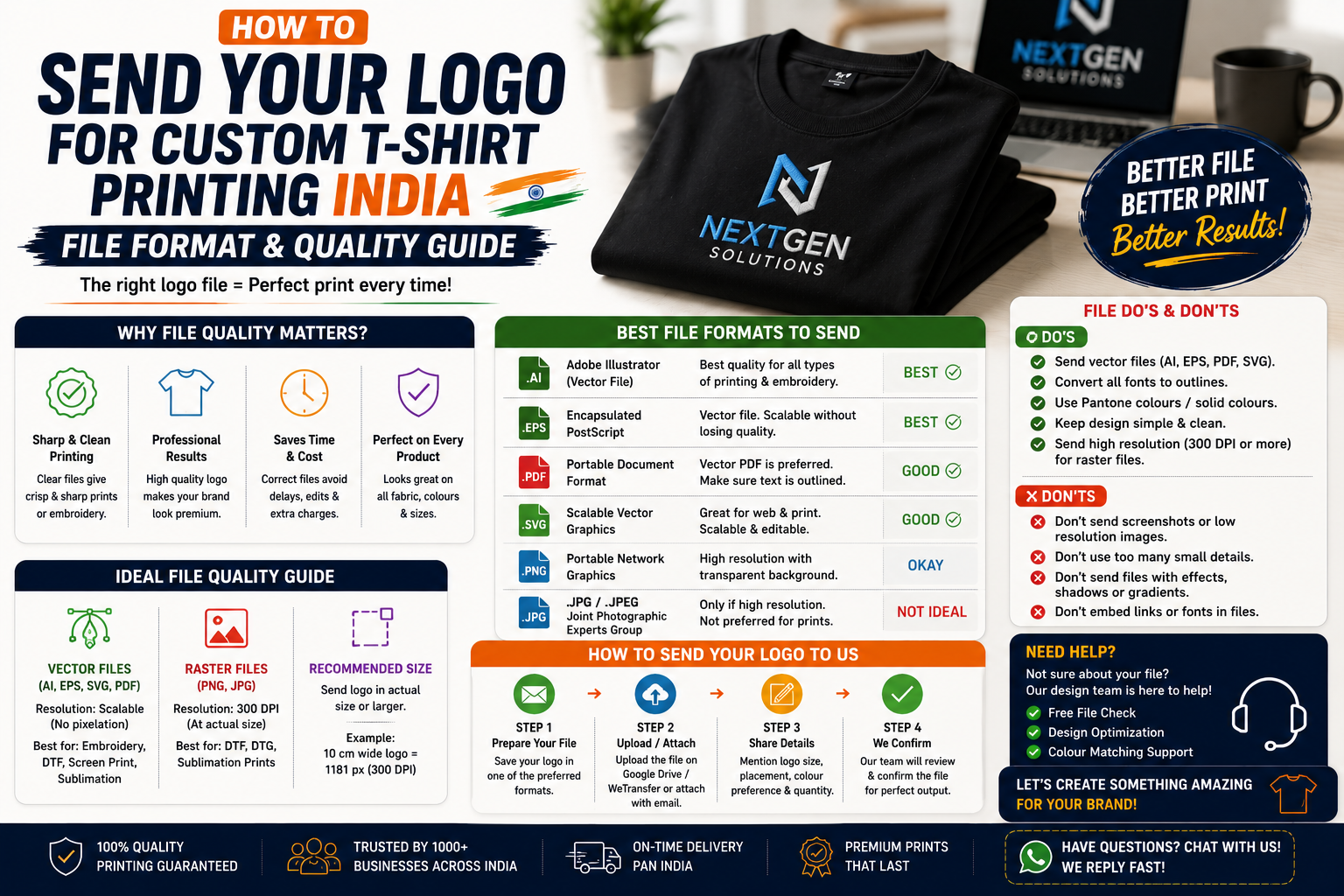
Ordering custom t-shirts sounds simple: choose a garment, upload your logo, select the printing method, and place your order.
But there is one step that can make a major difference to the final result: sending the right logo file.
A logo that looks sharp on your phone or laptop may become blurry, pixelated, or difficult to print when enlarged onto a t-shirt. Similarly, a file with the wrong background or colour profile can create problems during production.
Whether you’re ordering custom t-shirts for a company, college event, sports team, startup, wedding, fundraiser, or promotional campaign, understanding how to send logo for custom t-shirt printing India can save time and prevent unnecessary artwork revisions.
This guide explains which file formats to use, what resolution you need, how vector logos work, how to prepare transparent files, and what to send when you’re ordering embroidery.
Why Does the Logo File Matter?
Your logo file is essentially the blueprint for the printed or embroidered design.
A high-quality file allows the production team to reproduce:
- Sharp edges
- Clean text
- Accurate shapes
- Consistent colours
- Fine details
- Correct proportions
A low-quality image may produce:
- Blurry edges
- Pixelation
- Jagged text
- Missing details
- Incorrect colours
- Poor print quality
For custom logo t-shirt printing India, supplying a professional artwork file is one of the easiest ways to improve the production process.
Best File Formats for Custom T-Shirt Printing
Not all image files are equally useful for apparel printing.
1. AI — Adobe Illustrator
AI is a vector format commonly used for professional logo artwork.
It allows the logo to be resized without losing its basic sharpness.
Best For:
- Professional company logos
- Large prints
- Screen printing
- Artwork editing
- Complex branding projects
If your designer has supplied an AI file, keep it available.
2. EPS
EPS is another widely used vector format.
It can be useful for:
- Screen printing
- Logo reproduction
- Large-format artwork
- Professional production workflows
For vector logo for t-shirt printing India, EPS is often a good file to provide when available.
3. SVG
SVG is a scalable vector format commonly used for digital graphics and logos.
It can preserve clean shapes when resized.
It may be accepted by some apparel printers, although production requirements vary between suppliers.
4. PDF
A properly prepared PDF can contain vector artwork and is often convenient for sharing.
However, not every PDF is automatically a vector file.
A PDF exported from a design program can contain:
- Vector artwork
- Raster images
- Text
- Multiple elements
Ask your designer or printer whether the PDF contains editable/vector artwork.
5. PNG
PNG is one of the most useful raster formats for custom t-shirt printing.
A high-resolution PNG with a transparent background can work well for many digital printing methods.
Best For:
- DTF printing
- Digital printing
- Detailed graphics
- Logos with transparency
For PNG logo for t-shirt printing India, choose the highest-quality original file available rather than a compressed social-media download.
6. JPEG / JPG
JPG files are common but aren’t always ideal for professional printing.
JPEG compression can introduce artifacts around:
- Text
- Curves
- Edges
- Small details
A high-resolution JPG can still be usable, particularly for some digital printing applications, but a vector file or high-quality PNG is generally preferable when available.
Vector vs Raster: What’s the Difference?
This is one of the most important concepts when preparing a logo.
Vector Artwork
Vector artwork is created using mathematical shapes and paths.
It can usually be scaled up or down without becoming pixelated.
Common vector formats include:
- AI
- EPS
- SVG
- Some PDFs
Best For
- Logos
- Typography
- Icons
- Geometric artwork
- Screen printing
- Embroidery digitization
Raster Artwork
Raster images are made from pixels.
Common raster formats include:
- PNG
- JPG
- TIFF
Their quality depends heavily on resolution.
If a small raster image is enlarged too much, it can become pixelated.
For vector vs raster t-shirt printing India, vector artwork is generally the safer option for logos whenever available.
What Resolution Should Your Logo Have?
Resolution matters when you’re supplying raster artwork.
For many print workflows, a commonly preferred target is around 300 DPI at the intended print size.
However, DPI alone doesn’t magically improve a low-quality image.
For example, changing a small 500-pixel image from 72 DPI to 300 DPI doesn’t create new detail.
The actual pixel dimensions matter.
Better Approach
Instead of asking only:
“Is my logo 300 DPI?”
ask:
“Is my logo large enough to print at the required physical size?”
For example, a logo intended to print at 10 inches wide should ideally contain enough pixels to maintain sharpness at that size.
Your printer can confirm the exact production requirements.
Should You Send a Transparent Logo?
Usually, yes—especially for DTF or other digital printing workflows where the design needs to be placed directly on the garment.
A transparent PNG allows the printer to distinguish the artwork from the background.
For example:
Correct:
Logo artwork + transparent background
Potential problem:
Logo artwork + white rectangular background
If you place the second version on a black t-shirt, the white rectangle may appear around the logo.
For transparent logo for t-shirt printing India, a properly prepared PNG can be very useful.
What If Your Logo Has a White Background?
Don’t automatically assume the white background should be removed.
First determine whether the white area is actually part of the logo.
For example:
Logo A
Black logo + white background accidentally included.
The white background should usually be removed.
Logo B
White lettering intentionally designed as part of the logo.
The white lettering should remain.
If you’re unsure, send the original logo to the printer and explain which areas should be transparent.
Should You Send the Original Logo File?
Yes.
Avoid taking screenshots of your logo from:
- Website pages
- Email signatures
Social platforms often compress images.
Instead, look for the original file from:
- Your designer
- Brand guidelines
- Design software
- Company marketing folder
- Original logo package
For high resolution logo t-shirt printing India, the original source file is usually much better than a downloaded social-media image.
What Colours Should Your Logo Use?
If your brand already has official colours, provide the original brand specifications.
Your designer may have:
- HEX codes
- RGB values
- CMYK values
- Pantone references
For physical apparel printing, colour reproduction can vary depending on:
- Fabric colour
- Printing method
- Ink
- Material
- Production settings
Don’t assume that the colour on your monitor will look exactly the same on fabric.
For important corporate orders, approve a physical sample.
How to Send Logos for DTF Printing
DTF printing can handle detailed and colourful designs, making it popular for custom t-shirts.
A useful artwork package may include:
- High-resolution PNG
- Transparent background
- Original vector file, if available
- Correct print dimensions
- Clear instructions about placement
For DTF logo printing India, ask the supplier whether they prefer PNG, PDF, AI, EPS, or another format.
How to Send Logos for Screen Printing
Screen printing often requires artwork to be separated according to colours.
For example, a three-colour logo may require separate colour information for production.
Vector artwork is particularly useful.
If your logo contains:
- Gradients
- Photographic elements
- Very fine details
ask the printer whether screen printing is appropriate.
For screen printing logo file India, a vector file can make artwork preparation easier.
How to Send Logos for Embroidery
Embroidery is different from printing.
You generally don’t simply send a PNG and expect it to be stitched exactly as shown.
The logo needs to be converted into an embroidery-ready file through a process called digitization.
The embroidery provider may create a stitch file using formats such as:
- DST
- PES
- EXP
- JEF
The exact format depends on the embroidery machine.
You usually don’t need to create the stitch file yourself.
Instead, provide the cleanest original logo you have and let the embroidery provider handle digitization.
For logo embroidery file India, ask the supplier what source artwork they require.
What Information Should You Send With the Logo?
Don’t send only the image.
Provide basic production instructions.
For example:
Logo: Company logo
T-shirt colour: Navy blue
Print method: DTF
Placement: Left chest
Approximate size: 3.5 inches wide
Quantity: 100 pieces
Sizes: S–XXL
Required date: [Date]
This reduces back-and-forth communication.
How to Specify Logo Placement
Common placements include:
Left Chest
Popular for company branding.
Centre Chest
Good for promotional designs.
Full Front
Useful for artwork-heavy designs.
Upper Back
Suitable for large event or team branding.
Sleeve
Useful for secondary logos or small details.
If you’re unsure about sizing, ask your printer for recommended dimensions based on the garment.
What If You Only Have a Low-Quality Logo?
Don’t immediately enlarge it and save it as a bigger file.
That won’t recreate missing details.
Instead, ask your designer or printing provider to:
Vectorize / redraw / recreate the logo
This may involve rebuilding the artwork in a vector program.
For low resolution logo printing India, professional artwork recreation may be necessary before production.
Can You Send a Logo Through WhatsApp?
You can use WhatsApp for communication, but it isn’t always the best method for transferring production artwork.
If you send the logo through WhatsApp, make sure the original file is shared rather than a compressed preview.
When possible, use:
- Email attachment
- File upload
- Cloud storage
- Supplier upload portal
Ask the printing company which method they prefer.
How to Prepare Your Logo Before Ordering
Use this checklist.
File Checklist
- Original logo available
- Vector version available if possible
- High-resolution PNG available
- Transparent background where appropriate
- Correct logo colours
- No unnecessary background
- Text checked for spelling
- Correct proportions
- Print size discussed
- Placement confirmed
Order Checklist
- T-shirt colour finalized
- Fabric selected
- GSM selected
- Printing method selected
- Quantity confirmed
- Sizes confirmed
- Delivery deadline confirmed
- Sample approved if required
Common Logo File Mistakes
Sending a Screenshot
Screenshots often don’t provide enough resolution.
Using a WhatsApp Preview
Compressed images can lose quality.
Enlarging a Tiny JPG
Increasing dimensions doesn’t restore missing image detail.
Forgetting Transparency
A background may appear around the design.
Sending the Wrong Logo Version
Make sure you’re using the current approved brand logo.
Ignoring Colour Requirements
Different production methods may require colour adjustments.
Not Checking Print Size
A logo can look different when reproduced physically.
Frequently Asked Questions
What is the best file format for t-shirt printing?
AI, EPS, and SVG are useful vector formats for logos. A high-resolution transparent PNG is also commonly useful for digital printing. Always confirm the printer’s preferred format.
Is PNG good for custom t-shirt printing?
Yes. A high-resolution PNG with transparency can work well for many digital printing methods, including DTF.
Should a t-shirt logo be 300 DPI?
Around 300 DPI at the intended physical size is a common target for raster artwork, but actual pixel dimensions and the printing process also matter.
Should I send a JPG or PNG?
A high-resolution PNG is often preferable when transparency is needed. A vector file is generally better for logos if you have one.
What file is needed for embroidery?
Provide the original high-quality logo. The embroidery supplier usually digitizes it into a machine-specific stitch format such as DST, PES, or another supported format.
Can I send my logo on WhatsApp?
You can, but send the original file rather than a compressed screenshot or preview. Email or the supplier’s upload system may be preferable for production artwork.
What if my logo is blurry?
Ask the printer or designer whether they can recreate or vectorize it. Don’t assume enlarging a small image will make it print-ready.
Final Verdict
Knowing how to send logo for custom t-shirt printing India can make your custom apparel order faster, cleaner, and more predictable.
Whenever possible, provide the original vector logo in AI, EPS, SVG, or a suitable PDF. For digital printing, a high-resolution PNG with a transparent background can also be useful.
Don’t rely on screenshots or low-resolution social-media downloads. If the only file you have is blurry, ask a designer or printing provider about recreating it before production.
Also give your supplier clear information about the t-shirt colour, printing method, placement, approximate logo size, quantity, and deadline.
For embroidery, remember that the logo must be digitized into stitches, so the source artwork is more important than trying to create a machine stitch file yourself.
Finally, if you’re ordering a large quantity of custom logo t-shirts, approve a physical sample whenever possible. It lets you evaluate the actual logo size, colour, garment, print quality, and placement before the complete order is produced.
A high-quality logo file won’t solve every production issue—but it gives your printer the best possible starting point for creating a professional finished t-shirt.
Leave a Reply